
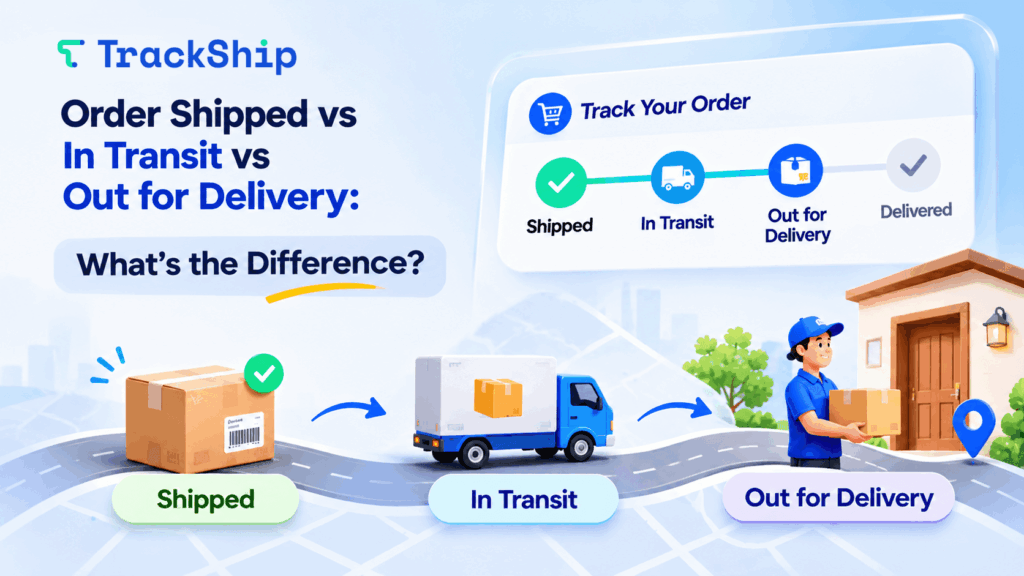
When tracking an online order, you may see different shipment statuses like Shipped, In Transit, and Out for Delivery. But what exactly do these statuses mean, and how are they different?
Understanding these shipping statuses helps customers know where their packages are and when to expect delivery. For WooCommerce store owners, providing clear tracking updates can also reduce “Where is my order?” (WISMO) inquiries and improve the post-purchase experience.
📦 What Does “Order Shipped” Mean?
Order Shipped means the seller has prepared and dispatched your order for delivery.
At this stage:
- The package may have been handed over to the shipping carrier.
- A tracking number is usually available.
- The carrier may not have scanned the package yet.
Important: A shipped status doesn’t necessarily mean the package is already moving. Sometimes, the shipping label has been created, but the carrier hasn’t collected the package.
🚚 What Does “In Transit” Mean?
In Transit means your package is moving through the carrier’s delivery network toward its destination.
During this stage, your shipment may:
- Travel between sorting facilities.
- Move through different cities or distribution centers.
- Wait at a carrier facility for its next transportation step.
A package can remain In Transit for several days, depending on the shipping distance, carrier, and delivery service.
Note: In Transit doesn’t always mean the package is physically moving at that exact moment.
🏠 What Does “Out for Delivery” Mean?
Out for Delivery means your package has reached the local delivery stage and is typically assigned to a delivery driver for its final journey.
At this stage:
- The package is usually with the local delivery team.
- Delivery is generally expected that day.
- The customer should be ready to receive the package.
However, Out for Delivery doesn’t guarantee same-day delivery. Unexpected delays, weather conditions, or unsuccessful delivery attempts can affect the delivery schedule.
🔍 Shipped vs In Transit vs Out for Delivery
Here’s a quick comparison of the three shipment statuses:
| Shipment Status | Meaning | What Happens Next? |
|---|---|---|
| Shipped | Order has been dispatched or marked as shipped | Carrier pickup or first tracking scan |
| In Transit | Package is progressing through the carrier network | Moves toward the destination |
| Out for Delivery | Package is in the final delivery stage | Delivery attempt is expected |
What Comes After Out for Delivery?
The next status is usually Delivered, meaning the carrier has recorded the package as successfully delivered.
Sometimes, the shipment may instead show Delivery Attempt Failed or Exception if the carrier encounters an issue.
💡 Why Shipment Status Updates Matter for WooCommerce Stores
Keeping customers informed about shipment progress is essential for a positive post-purchase experience.
With accurate shipment tracking, WooCommerce store owners can:
- Reduce WISMO inquiries: Customers can check their shipment status without contacting support.
- Improve customer experience: Proactive delivery updates keep customers informed.
- Identify delivery issues: Monitor delayed shipments and delivery exceptions.
- Build customer trust: Provide clear tracking information throughout the delivery journey.
🚀 Automate Shipment Tracking with TrackShip for WooCommerce
TrackShip for WooCommerce helps store owners automatically monitor shipment statuses and keep customers updated throughout the delivery process.
With TrackShip, you can:
- Track shipments across multiple shipping carriers.
- Monitor In Transit, Out for Delivery, Delivered, and other shipment statuses.
- Send automated shipment status email notifications.
- Provide customers with a branded tracking page.
- Monitor shipment performance through a centralized dashboard.
Instead of manually checking carrier websites, you can manage shipment tracking directly from your WooCommerce store.
Final Thoughts
Understanding the difference between Shipped, In Transit, and Out for Delivery helps customers know what to expect from their deliveries.
For WooCommerce store owners, providing clear and timely shipment updates can reduce support inquiries and create a better post-purchase experience.
With TrackShip for WooCommerce, you can automate shipment tracking, keep customers informed, and improve delivery visibility from shipped to delivered.
Start automating your WooCommerce shipment tracking with TrackShip.
Related Articles
Shipment Tracking for WooCommerce: Complete Guide for Store Owners
For WooCommerce customers, the experience doesn’t end at checkout. Once an order ships, they want…
Read Article →
How to Reduce WISMO and Improve the Post-Purchase Experience
“Where is my order?” It sounds like a simple customer question. But when your store…
Read Article →
Elevate Your Shipping Game: Tips for eCommerce Businesses
As an eCommerce business, keeping your promises for shipping to customers is crucial to building…
Read Article →